


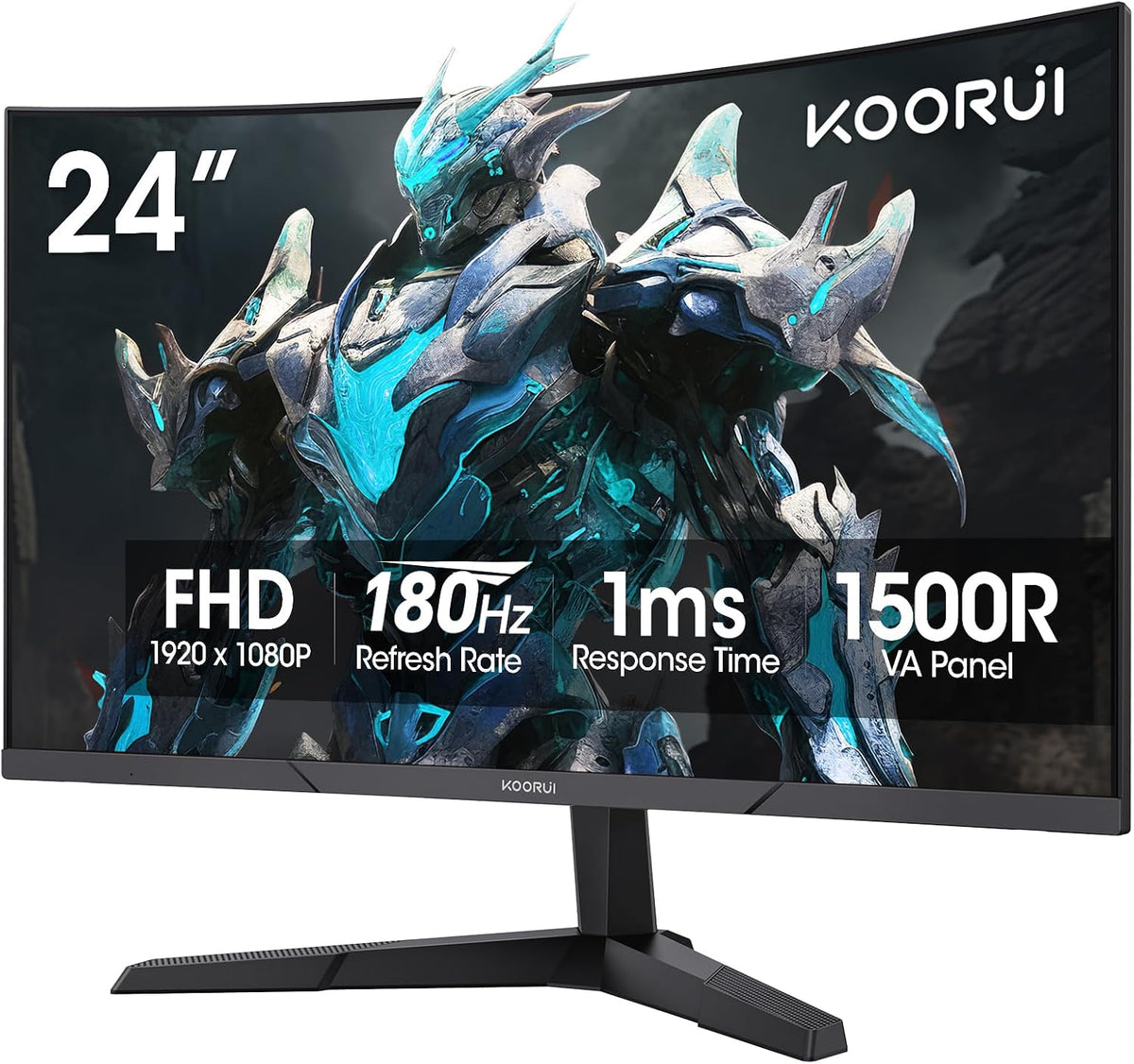
A 24-inch curved monitor can give a compact desk a wraparound feel, but screen shape is only one part of the choice. Check the resolution, refresh rate, video inputs and mounting options before you buy. In the KOORUI range, the 24E6CA and 24N5CA serve different needs even though both have a curved VA panel.
This guide compares those two models with the flat G2421V, so you can choose by how you use your computer.
Start with what matters on your desk
- For a curved gaming setup: start with the 24E6CA, which pairs a 24-inch Full HD screen with a maximum refresh rate of 180Hz.
- For everyday work and study: compare the 24N5CA, a 23.6-inch Full HD curved screen with a maximum refresh rate of 100Hz.
- For a compact screen with more pixels: consider the flat G2421V. Its 24-inch QHD display has a 2560 × 1440 resolution and a maximum refresh rate of 180Hz.
These are starting points, not a claim that one model is best for everyone. Your available desk space, computer outputs and preferred screen shape should decide the final choice.
Compare the three models
| Feature | 24E6CA | 24N5CA | G2421V |
|---|---|---|---|
| Screen | 24-inch VA | 23.6-inch VA | 24-inch Fast IPS |
| Shape | 1500R curved | 1500R curved | Flat |
| Resolution | 1920 × 1080 | 1920 × 1080 | 2560 × 1440 |
| Maximum refresh rate | 180Hz | 100Hz | 180Hz |
| Video inputs | HDMI, DisplayPort | HDMI, VGA | HDMI, DisplayPort |
| VESA mounting | 100 × 100mm | Not supported | 75 × 75mm |
Specifications reflect the US product versions listed on this site. Older listings and regional versions may differ. Confirm the exact model and variant on Amazon before ordering.
Curved or flat: choose the experience you prefer
The 24E6CA and 24N5CA bring the screen edges toward the viewer. This can suit a centered, single-monitor setup. The G2421V gives you a flat screen if that is the shape you prefer for documents, games or a desk with multiple displays.
Screen diagonal does not tell you the complete footprint. Before ordering, compare the monitor and stand dimensions with the space behind your keyboard. Leave room for connectors and cable bends, and check whether the screen can sit at a comfortable height.
If you plan to use a monitor arm, check the mounting pattern first. The 24N5CA does not support VESA mounting; the 24E6CA and G2421V use different VESA patterns. An arm must also support the monitor's weight and required mounting hardware.
100Hz or 180Hz: match the screen to your computer
Refresh rate describes how often the display can update each second. A higher supported rate can make motion look smoother, but it does not make your computer render a game at the same number of frames per second. Consider the frame rates your computer achieves in the games and settings you actually use.
For the two curved models in this guide, 100Hz is the 24N5CA's maximum and 180Hz is the 24E6CA's maximum. The available modes depend on the monitor, connection, cable and graphics hardware. Do not assume every input supports the maximum rate.
After connecting a monitor, check the selected resolution and refresh rate in your operating system. In Windows, this is under Settings → System → Display → Advanced display. Microsoft's refresh-rate instructions explain how to choose an available mode.
1080p or 1440p at this size?
Both curved models here use Full HD, also called 1080p. The flat G2421V uses QHD, also called 1440p, and puts more pixels into a similar screen size. It is a useful alternative when you want to compare a compact QHD display with the curved Full HD options.
For games, consider resolution and refresh rate together. Your graphics hardware, game and quality settings determine which combination is practical. For work, check your preferred text scaling and application layout as well as the pixel count.
A short checklist before ordering
- Match the exact model name to the features you need.
- Check the computer's video output and the monitor's supported input modes.
- Measure the desk space and confirm stand or VESA requirements.
- Review the user manual and available setup documents.
- Open the model's product page, then use its Amazon button to check the current price, seller, availability and delivery options.
View the 24E6CA curved gaming monitor · View the 24N5CA curved monitor · View the G2421V QHD alternative
Looking for a larger display? Explore the full gaming monitor range or compare monitors for work and study.
Share:
HKC, KOORUI and ANTGAMER Bring Hands-On Displays and Interactive Events to TGS 2026